ARDUINO-UNO-Q
Arduino UNO Q Hands-On Tutorials
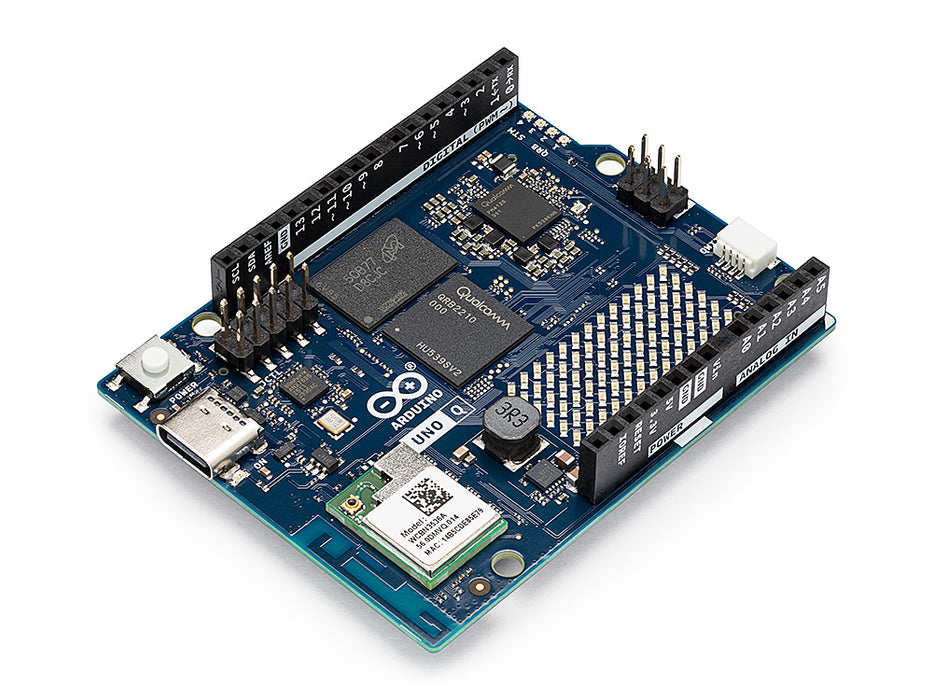
Why the Arduino UNO Q for an ML Engineering Course?
In the Edge AI Machine Engineering courses, we have traditionally used separate hardware platforms for different tiers of the ML deployment spectrum:
-
TinyML on microcontrollers (MCUs): Boards like the Arduino Nano, Nicla Vision, and Seeed XIAO ESP32S3 Sense running quantized models under extreme memory constraints (256 KB–512 KB RAM, no OS). Students learn to deploy keyword-spotting, image-classification, and anomaly-detection models using TensorFlow Lite (LiteRT) for Microcontrollers and Edge Impulse, operating at milliwatt-level power.
-
Edge AI on single-board computers (SBCs): even within this tier, we’ve historically split the work across two different boards. A Raspberry Pi Zero 2 W handled “Fixed-Function AI” — trained, task-specific models: image classification, object detection, keyword spotting. Generative AI — small language models, multimodal reasoning — needed a Raspberry Pi 5; the Zero simply didn’t have the RAM or CPU headroom for it. Two boards, two capability tiers, inside the same “SBC” category.
These have always been taught as separate worlds — MCU-based TinyML, Fixed-Function SBC Edge AI, and Generative AI on a beefier SBC — each with its own toolchain and, in the SBC case, its own hardware.
The Arduino UNO Q bridges more of this than any single board before it.
Its dual-brain architecture — a Linux-capable Qualcomm QRB2210 MPU paired with a real-time STM32U585 MCU on the same board — lets students experience MCU-style real-time control and SBC-style AI inference simultaneously, in one project: an AI model runs in Python on the Linux side (like on a Raspberry Pi) while an Arduino sketch on the MCU side handles sensors, motors, and LEDs (like on a Nicla or XIAO) — the two communicating through Bridge RPC.
It also closes the gap within the SBC tier that used to require two different Raspberry Pis. The 2 GB UNO Q outperforms a Pi Zero 2 W at Fixed-Function AI and, unlike the Zero, is enough to introduce real Generative AI — running a small language model locally, as chapters 2–5 of this course do. The 4 GB variant pushes further still. The Raspberry Pi 5 remains the right tool for heavier generative workloads (larger models, real-time multimodal pipelines) that outgrow what the UNO Q can hold in RAM — but for a huge slice of what used to require the Pi 5, the UNO Q is now enough, and it’s the only one of the three that also gives you real-time hardware control on the same board.
How the UNO Q Compares to What We’ve Used Before
| Aspect | MCUs (Nano, Nicla, XIAO ESP32S3) | SBCs (RPi Zero 2W, RPi 5) | Arduino UNO Q |
|---|---|---|---|
| CPU | Single/Dual-core, 80–240 MHz | Quad/Multi-core, 1–2.4 GHz | Quad-core A53 @ 2 GHz + Cortex-M33 |
| RAM | 256 KB – 1MB (8MB w/PSRAM) | 512 MB – 8 GB | 2 GB or 4 GB + MCU SRAM |
| OS | Bare-metal / RTOS | Linux (Raspberry Pi OS) | Debian Linux + Zephyr RTOS |
| ML Frameworks | TFLM, Edge Impulse (C/C++) | TF Lite, ONNX, PyTorch (Python) | Both: Python ML + Arduino C++ |
| Real-time I/O | Native (GPIO, ADC, PWM) | Via libraries (no determinism) | Dedicated MCU (deterministic) |
| Power | Milliwatts (battery-friendly) | 1–5 W (RPi Zero) / 5–27 W (RPi 5) | ~3–5 W |
| Camera support | Built-in (Nicla, XIAO) | USB or CSI cameras | USB or MIPI-CSI (via carrier) |
| Price | ~$15 (XIAO) –$90 (Nicla) | $15 (Zero) / $120 (RPi 5) | ~$50 (2 GB) / ~$60 (4 GB) |
| AI Acceleration | None (CPU only) | None (RPi 5 CPU) or external | Adreno GPU |
| Ecosystem | Arduino IDE, PlatformIO | Full Linux / pip / Docker | Arduino + Linux + App Lab CLI |
What the UNO Q Brings to the Course
The UNO Q does not replace the MCU boards or the Raspberry Pi in our curriculum — it complements them by offering a unique “middle ground” that is pedagogically valuable:
- Unified TinyML + Edge AI workflow: Students deploy ML models in Python while controlling the physical world from Arduino sketches — on the same board, in the same project.
- Real Linux skills on an Arduino: The board runs standard Debian, so students practice SSH, package management, Python environments, and Git — all skills that transfer directly to Raspberry Pi, cloud servers, and production edge devices.
- Low barrier to entry: Students familiar with Arduino from introductory courses find the UNO form factor, pin layout, and shield compatibility immediately recognizable. The learning curve is adding Linux, not starting from scratch.
- Generative AI, not just Fixed-Function AI: the 2 GB variant is the first board in this course’s SBC lineup that can introduce local LLMs/SLMs — previously a Raspberry Pi 5-only capability — while still being a capable Fixed-Function AI board in its own right.
- Edge Impulse integration: The UNO Q has first-class Edge Impulse support, with pre-loaded models for image classification, object detection, keyword spotting, and anomaly detection — the same tasks we teach across the course.
- Cost-effective classroom deployment: At ~$50 for the 2 GB variant, the UNO Q is comparable in price to a Raspberry Pi 4 but includes the MCU subsystem, Wi-Fi, Bluetooth, and LED matrix out of the box — no additional HATs or accessories needed for basic projects.
Tutorials
Getting Started
- 1. Setup — headless board bring-up over ADB, Wi-Fi, and SSH; running and inspecting the pre-installed examples; the
arduino-app-cliworkflow.
Generative AI
A small language model, run entirely on the board, taught progressively — first as a standalone tool, then wired into vision, into physical sensors and actuators, and finally into an agent that decides what to do on its own.
- 2. Generative AI at the Edge — building
llama.cppfrom source, running Qwen3.5 from the CLI and from a localllama-server, and calling it from Python with theopenaiclient. - 3. Multimodal AI at the Edge — giving the same model eyes: loading a vision projector, running a vision-enabled server, and reasoning about camera/image input.
- 4. GenAI Meets the Real World — a dual-brain dengue-risk classifier:
llama-serveras a persistent systemd service, sensors and actuators on the MCU, Bridge RPC connecting Python and the sketch, and an optional Flask endpoint. - 5. Agentic AI at the Edge — native tool-calling: the model decides which tools to call and in what order, starting hardware-free (system info, files, a calculator, the onboard LED and LED matrix) and extending to real sensors and actuators.
Fixed-Function AI
Trained, task-specific models — no language model involved — deployed and driven the same dual-brain way.
- 6. Image Classification — training a custom classifier in Edge Impulse Studio and deploying it to the UNO Q, both on static images and a live camera feed.
- 7. Object Detection — coming soon.
Arduino UNO Q Teaching Materials
- Fundamentals - [Book] [Slides] [Video]
- SLMs at the Edge - [Book]
- Arduino UNO Q: The most POWERFUL Arduino ever! [Video]
- Setup - [Book] [Slides] [Video]
- Generative AI - [Book] [Slides] [Video]
- Multimodal AI - [Book] [Slides] [Video]
- GenAI Meets the Real World - [Book] [Slides] [Video]
-
Agentic AI at the Edge - [Book] [Slides] [Video]
Tutorials created for IESTI05 — Edge AI Machine Learning System Engineering, UNIFEI. Licensed under GNU General Public License 3.0.